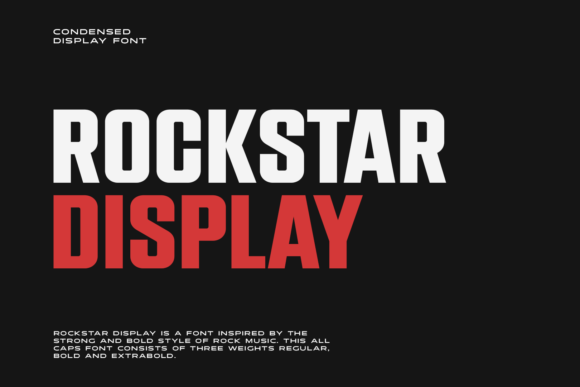
Rockstar: The Bold Display Font That Needs a Strategy
If you are looking for a typeface that commands attention immediately, Rockstar is likely the first name on your list. This cool, bold, and thick lettered display font was designed specifically to cut through the noise of modern digital interfaces. It possesses a distinct futuristic touch that makes it ideal for web designs, business cards, or any project requiring an edgy, high-impact aesthetic. However, just because a font looks impressive in isolation does not mean it will work effectively in your final design. Many creators rush to download Rockstar without considering the context, leading to projects that feel overwhelming rather than professional.
The appeal of this font lies in its heavy weight and unique character shapes. It screams "future" and "innovation," making it a favorite for tech startups, gaming brands, and creative portfolios. Yet, the very traits that make it exciting also make it dangerous if used incorrectly. When applied without a clear plan, the thickness of the letters can obscure readability, and the futuristic styling can clash with more traditional brand elements. Understanding the nuances of Rockstar is essential for anyone who wants their communication to be both stylish and functional.
The Trap of Overusing Bold Typography
One of the most common mistakes designers make with Rockstar is treating it as a headline-only solution while neglecting the body text hierarchy. Because the font is so visually dominant, there is a natural tendency to use it everywhere. You might be tempted to write your navigation menu, your subheadings, and even your introductory paragraphs in this thick style. This approach creates a visual wall of text that exhausts the reader's eyes and dilutes the impact of the actual message.
When every element screams for attention, nothing stands out. The result is a design that feels chaotic and unprofessional. Instead of guiding the user's eye to the most important information, the font fights for dominance against itself. To avoid this, reserve Rockstar strictly for primary headlines, logos, or short call-to-action buttons. Pair it with a clean, neutral sans-serif font for your body copy. This contrast ensures that the futuristic flair of Rockstar remains a special feature rather than the entire story.
Web Design Pitfalls and Readability
In the realm of web design, usability should always take precedence over aesthetics. A frequent error involves placing Rockstar on backgrounds that lack sufficient contrast or using it for long blocks of text. The thick strokes of the letters can cause them to merge together, especially at smaller sizes or on lower-resolution screens. This leads to poor legibility, which increases bounce rates and frustrates users trying to find information quickly.
Furthermore, the futuristic nature of the font can sometimes interfere with accessibility standards. If your target audience includes older adults or those with visual impairments, the stylized curves and heavy weights of Rockstar might create barriers to reading. Before committing to this font for a website, test it across different devices and screen sizes. Ensure that the letter spacing (kerning) is adjusted correctly, as default settings often crowd the characters too tightly for comfortable reading.
Evaluating Licensing and Download Sources
Another area where many professionals stumble is the acquisition of the font file. There is a misconception that all fonts found online are free to use for commercial purposes. Rockstar is a popular typeface, which means it is frequently distributed through various third-party sites with unclear licensing terms. Using a font without verifying its license can lead to legal issues, financial penalties, and the forced removal of your published work.
Before you download Rockstar, check the specific terms of use. Are you allowed to use it for a client's business card? Can you embed it in a mobile app? Some licenses restrict usage to personal projects only, while others require a fee for commercial applications. Always purchase from reputable font foundries or official marketplaces to ensure you have a legitimate license. This step protects your reputation and ensures that your investment in the design is secure.
- Verify the License: Check if the license covers your specific use case, such as print, web, or app embedding.
- Check File Formats: Ensure the package includes necessary formats like OTF, TTF, and WOFF for web compatibility.
- Read the Fine Print: Look for restrictions on the number of impressions or geographic regions covered by the license.
Matching Brand Identity with Futuristic Styles
A significant misunderstanding among entrepreneurs is assuming that a futuristic font automatically aligns with a modern brand identity. While Rockstar certainly looks advanced, it may not fit every industry. For example, a law firm or a healthcare provider might find the aggressive, thick style of this font to be inappropriate or off-putting. It conveys energy and rebellion, which could undermine trust in sectors that prioritize stability and care.
Before integrating Rockstar into your branding, ask yourself what emotion you want to evoke. If you are launching a new gaming console or a cutting-edge software platform, the font is likely a perfect match. However, if you are building a community-focused non-profit or a boutique bakery, the boldness might feel out of place. A mismatch between the typography and the brand voice can confuse customers and weaken your marketing efforts.
Practical Tips for Better Implementation
To get the most out of Rockstar, focus on balance and intentionality. Start by creating a mood board that includes the font alongside images and color palettes that reflect your desired outcome. This helps you visualize how the thick, bold letters interact with other design elements. Don't rely on the font to do all the heavy lifting; let it support your content rather than overshadow it.
When applying the font to physical media like business cards, consider the printing process. The thick ink required for Rockstar can sometimes bleed slightly on certain paper stocks, causing the edges to look fuzzy. Test your proofs before running a full batch. Additionally, ensure that the white space around the text is generous enough to let the letters breathe. Crowding a bold font against the edge of a card or page can make the design feel cramped and cheap.
For digital projects, remember that responsive design is key. The font size that looks perfect on a desktop monitor might become illegible on a smartphone. Use CSS media queries to adjust the size of Rockstar based on the device width. This small adjustment ensures that your futuristic design remains accessible and effective for all users, regardless of how they access your content.
Final Thoughts on Making the Right Choice
Ultimately, Rockstar is a powerful tool in the designer's arsenal. Its cool, bold, and thick lettered display style offers a unique way to inject personality into a project. However, success depends on how well you understand its limitations and strengths. By avoiding the trap of overuse, verifying your licensing, and matching the font to your brand's core values, you can leverage its futuristic touch to create stunning results.
Take the time to evaluate your needs carefully. Do not choose a font simply because it is trendy or looks flashy. Choose it because it solves a communication problem and enhances the user experience. With the right approach, Rockstar can elevate your web designs, business cards, and creative projects to a new level of sophistication and impact.